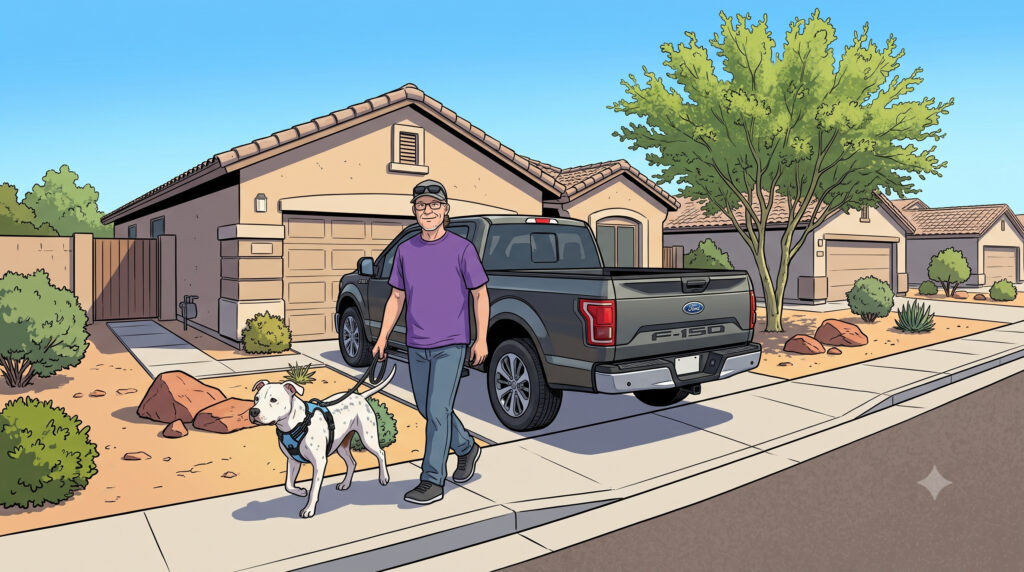
This song was inspired on a trip to Phoenix to dog-sit my pal Finn while his family was out of town. Their neighborhood has several houses where the back or front of a pick-up truck overhangs the sidewalk even though they are parked as close to their garage door as possible. I thought of the song title “Short Skirt/Long Jacket” by CAKE written by their lead singer John McCrea. I twisted it a bit with the words I had so that the syllables would line up with the original. Once I had the song title, I knew where I wanted to go with it.
The lyrics for the verses were the next step. I have dabbled with using AI to help with that before so I dove in to Google’s Gemini (not the AI search, their dedicated AI site). I gave it my idea for the tongue-in-cheek lyrics based on the title and sights, sounds and animals I wanted in the first prompt and it did a pretty good job, but it needed refinement. I told it to remove some things and added even more detail on the second prompt and it gave me most of the words. I had to reword some of it, delete some lines and add a word here or there to make it fit the music. It captured the details and the humorous tone I was looking for.
At this point, I was ready to put the words to the music. Using Logic Pro 12.2 on my Mac, I started with CAKE’s recording and used the stem extraction tool to separate the song into tracks: vocals, drums, bass, guitar, brass. I have found that this really helps me in breaking down parts for me to replace the original with my own. So I started recording my own vocal parts beginning with the lead. After a few takes, I had what I wanted – then I EQ’ed it to a narrow frequency range and added a compressor and an amp/distortion effect. Then I moved on to the backing vocal – the repeats of a few phrases and the Na Na Na parts. Instead of multiple backing singers like the original, I decided to use just the one vocal track with a chorus and a couple different delay effects to thicken it up and make it sound more like multiple voices. So at this point I had my vocals with the original drums, bass, guitar and brass and it was a fun place to be, but I wanted to replace all the original parts with my own.
Next up, the drums. Logic Pro has a Session Drummer that can generate some pretty awesome drum parts with just a few parameters to tweak. I used a basic pattern and had it follow the original drum track which got me something close, but not a direct copy. That’s just what I was looking for, but then it needed a few tweaks, so I converted it to a MIDI region so I could delete the hits where the drums stop in the original. Then I moved on to the other percussion like the Vibraslap, Cowbell, and Güiro. I found a Vibraslap loop and dropped it into an audio track in all the right places. The Cowbell was another SoCal drummer track with a MIDI region where I manually programmed the hits. The Güiro was found in the Sampler Orchestral Percussion kit and I drew in those notes manually, too. A little mixing to get the levels about right (More Cowbell) and I was pretty happy with the drums.
Next came the parts I was more concerned with – bass and guitar. Those would be more musically challenging for me, so I turned to the Internet for some help from a MIDI file that someone had posted of Short Skirt/Long Jacket. I downloaded it and started a new Logic Pro session to see if it was good and matched the original pattern-wise. It was pretty good, but there were some issues. The first issue was that there were some extra rests that needed to be deleted, but that was easy. Next, the bass part had some simplified bits that did not feel right to me, so I created a new Software Instrument track and used Logic Pro’s Varispeed option to slow things down so I could mimic the original bass lines in a few places. My playing was close, but definitely not as perfect as the rest of the MIDI bass track, so I quantized it to line up with the grid, then looped that so I only had to play it once. I made a few tweaks manually and called the bass track done choosing the upright bass for a clean sound. Not exactly like the original, but that was what sounded right to me.
The MIDI guitar track was used verbatim minus the extra measure I had already deleted. I could have chosen a guitar patch that sounded very close to the original recording, but I wanted to stray away from the original to put my own twist on it, so I chose a Wurlitzer electric piano sound instead. Being a keyboard guy, it just seemed to fit me better.
Finally, I needed something to replace the brass parts which naturally led me to my alto saxophone which I had recently dusted off and started playing some for another project. The trumpet parts are short bits, so I “punched in” on each bit and looped on it learning the part until I was happy with that bit, then moved on to the next bit. One of the last parts was fast and had a very specific pattern, so I turned back to Varispeed to slow it down, wrote down the pattern in chicken scratch and practiced with the original until I was ready to speed it back up some, and practice more. Once I thought I had it, I went back to the original speed and got a take that I was happy with – not perfect, but close enough. One more closing bit and the recording phase was done.
Next came the mixing and mastering which was pretty quick as I had done some rough mixing as I went. I used the pitch correction plug-in on the sax because it just never is in tune for all notes and I find it a little annoying being sharp here and flat there. A little reverb to thicken up the sax and a few more tweaks to the mix and I was ready for a final bounce.
Next came the question of how can I share it and the best approach was YouTube. They have the Content ID system to match commercial songs and not force you to take it down because it is a derivative work. YouTube simply directs any monetization from my video back to the original artist – John McCrea. I’m not trying to make money here, this is just for fun. I didn’t want just a static image with the audio, so I set out on my next mission of the visual side of things.
I had a few photos of me and Finn but not enough to tell the whole story. So I turned to Google’s Gemini again but this time used the specific “Images” section which can generate high quality images from textual prompts. I first asked it if it could generate a sequence of 1920×1080 (HD) line-drawing cartoon images based on a few photos that I would upload. Gemini was able to take the images as a basis for the cartoon images. The original chat where I generated the lyrics helped me with creating the prompts for most of the images. Some of them were great on the first try, like the one of Finn and a rabbit both wide-eyed, but some needed several re-prompts to get something I was happy with. I downloaded the good ones and turned to mashing it all together.
For creating the video I chose Kdenlive, a free open-source software video editor which I’ve used for other recent video projects. I brought it up and imported the high quality audio .wav file that I bounced from Logic Pro and added the images into the project bin. From there it was just a matter of sequencing the images to align with the story in the song. I did have to go back to Gemini to generate a few more images to fill in a few blanks. I decided to just use simple “cut” transitions not anything too fancy. I added opening and closing credits to make it clear that this was based on “Short Skirt/Long Jacket” by John McCrea and CAKE and that I used Google Gemini for image creation. I intentionally did not try to hide or cover up the watermark in the images so the AI mark is clear.
I did seek the approval of our friends before releasing this since it does use images of their dog and pokes fun at their neighborhood and they loved it. I hope you do, too.
P.S. – I did not use AI to write this, but I did get some editing advice from my lovely bride! Feel free to share this with anyone you think might enjoy the humor. Extra credit to those of you that read all the way to the end!